Open source under MIT, for React apps with a Node server, running on your machine.
An agent finds a planted bug in tududi
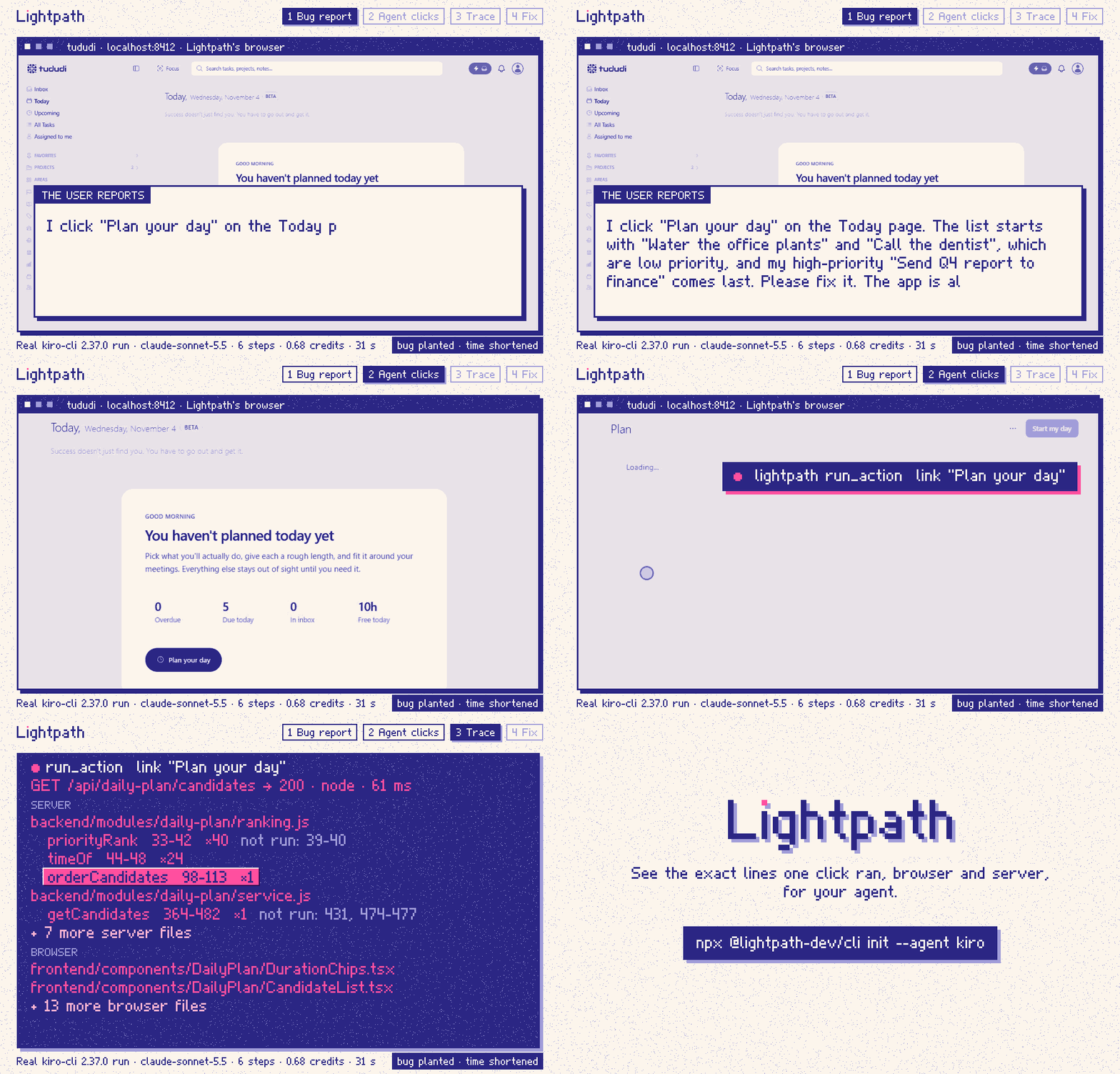
An agent gets a bug report for tududi, an open-source task manager: “I click Plan your day and my high-priority task comes last.” It clicks the link itself, reads the trace and fixes the sort.
One real kiro-cli 2.37.0 run (model claude-sonnet-5.5): 6 tool calls, 0.68 credits, 31.5 s. The bug was planted in a local copy for this demo; tududi doesn’t have it. The GIF shortens the time to 19.7 s and leaves out two failed clicks. The agent said it had not checked the fix in the running app; the “after” screen comes from our recording script.
Your agent reads a bug report and can only read code. It picks where to look from file names and text search. When that runs out, it asks you to click the button and paste what you see.
With Lightpath MCP
The agent clicks the button itself, in a browser Lightpath opens.
It gets back the functions and lines that ran, in the browser and on your Node server, and the lines inside them that didn’t.
Errors and failed requests come in the same answer.
After a fix, it clicks again and compares the two traces.
Lines come from V8’s own coverage counters, so they show what ran, not what the code seems to do.
What your agent gets back
Part of the real answer from the tududi run above, cut where it says “…”. Each line is a function that ran: its name, its line numbers, and how many times it ran. The dots show the count. After “not run” come the lines inside it that didn’t run.
run_actiontarget: link "Plan your day"
Trace t_9e6f6yh4su1u: a: plan-your-day
action: click link "Plan your day" (boundary press, settled timeout)
page: http://localhost:8412/today/plan
warning (timeout): timed out after 5000 ms: requests were still running, so the trace may be partial.
request: GET /api/daily-plan/candidates → 200 (node, 61 ms)
request: GET /api/daily-plan → 200 (node, 24 ms)
GET /api/daily-plan/candidates → 200 [node, 61 ms]
backend/modules/daily-plan/ranking.js
priorityRank 33-42 ×40not run: 39-40, ran 40 times
timeOf 44-48 ×24, ran 24 times
recently_touched 51-52 ×6, ran 6 times
compareCandidates 58-69 ×11, ran 11 times
rankCandidates 71-73 ×5, ran 5 times
(anonymous) 72 ×8, ran 8 times
bucketOf 75-76 ×6, ran 6 times
normalizeOrder 82-95 ×2, ran 2 times
(anonymous) 85-86 ×10, ran 10 times
(anonymous) 88 ×10, ran 10 times
orderCandidates 98-113 ×1, ran once
groupRank 100-101 ×18, ran 18 times
(anonymous) 101 ×90, ran 90 times
(anonymous) 102-103 ×5, ran 5 times
(anonymous) 103 ×5, ran 5 times
(anonymous) 106-111 ×9, ran 9 times
backend/modules/daily-plan/service.js
parseSuggestedLimit 347-356 ×1not run: 349-355, ran once
getCandidates 364-482 ×1not run: 431, 474-477, ran once
…
once2–45–910–3940 or more28 of the answer’s 276 lines. Full answer in the run’s transcript. Every answer is at most 16,000 characters, about 4,000 tokens.
How it works
The agent clicks
run_action clicks a button or link in the Chromium browser Lightpath opened for your app. It can fill form fields first.
V8 records what ran
Lightpath reads V8’s coverage just before and after the click: in the browser over the DevTools Protocol, and in your Node server through a small preloaded agent. Requests from the click carry a header that joins the two.
Your agent gets the trace
Source maps turn the byte ranges into your own files and lines. The answer goes to your agent over MCP, cut to fit 16,000 characters.
What it does
run_action: click and trace in one call
The agent names a button or link the way a person would. Lightpath clicks it and returns that click’s trace. You don’t click or paste anything.
run_action  target: button "Mark as paid"  within: "Kestrel Labs"

request: POST /api/invoices/INV-2041/pay → 200 (node, 4 ms)
…
  server/services/ledger.ts
    getSummary 14-28 ×1 not run: 16-27
…
A thrown error and failed requests, like a 409 or a 400, show up in the same answer as the code that ran. Lines after a call that threw read unknown, never run: V8 has no count for them.
D-121, D-153, tested in scripts/e2e-shop.mjs and pnpm accuracy.
Check a fix in one call
After a fix, the agent runs the same click with compareTo: "last". The answer adds what ran in only one of the two traces: functions, not-run lines and request status.
D-118, D-144, tested in scripts/e2e-invoices-fix.mjs.
run_request for API backends
One HTTP request to your app on localhost, no browser. You get the backend lines it ran. Loopback only: it refuses other hosts, redirects and proxies.
D-125, 18 cases in packages/mcp/test/request.test.ts, scripts/e2e-api.mjs on 7 backend apps.
One command to set up
For Claude Code, Cursor, VS Code or Kiro. It writes the agent’s MCP config, a lightpath.config.json and a short note in AGENTS.md on when to use Lightpath.
The daemon listens on 127.0.0.1 and needs a token. Lightpath sends no data off your machine. Secrets in URLs, tokens and key=value pairs become [redacted], and request and response bodies are never collected.
In your app’s folder: a React frontend, a Node server and a dev script in package.json. You need Node.js 22.12 or newer and Chrome or Edge.
npx @lightpath-dev/cli init --agent claude-code
npx @lightpath-dev/cli doctor
init writes .mcp.json, lightpath.config.json and a short block in AGENTS.md. doctor checks what it wrote. Then restart Claude Code.
Setup tested in CI. How Claude Code picks and calls tools is from its docs. Claude Code guide.
npx @lightpath-dev/cli init --agent cursor
npx @lightpath-dev/cli doctor
init writes .cursor/mcp.json, lightpath.config.json and a short block in AGENTS.md. doctor checks what it wrote. Then restart Cursor.
Add to Cursor adds only the MCP server, in the macOS and Linux form. Run init too for auto-start and the AGENTS.md block.
Setup tested in CI. How Cursor picks and calls tools is from its docs. Cursor guide.
npx @lightpath-dev/cli init --agent vscode
npx @lightpath-dev/cli doctor
init writes .vscode/mcp.json, lightpath.config.json and a short block in AGENTS.md. doctor checks what it wrote. Then restart VS Code.
Install in VS Code adds only the MCP server, in the macOS and Linux form. Run init too for auto-start and the AGENTS.md block.
Setup tested in CI. How VS Code picks and calls tools is from its docs. VS Code guide.
npx @lightpath-dev/cli init --agent kiro
npx @lightpath-dev/cli doctor
init writes .kiro/settings/mcp.json, lightpath.config.json and a short block in AGENTS.md. doctor checks what it wrote. Then restart Kiro.
Run end to end with kiro-cli 2.37.0, in the benchmark and the demo. Kiro guide.
npx @lightpath-dev/cli init --agent other
npx @lightpath-dev/cli doctor
init --agent other writes lightpath.config.json and a short block in AGENTS.md, writes no client config, and prints this entry for your client's MCP config:
On Windows the command is cmd with /c npx first in args, as init prints it. VS Code-style configs use servers instead of mcpServers. Auto-start needs the lightpath.config.json that init writes.
Not tested with any client. Clients that start a stdio MCP server, such as Windsurf, Cline, Zed, Continue, Codex CLI, Gemini CLI and Claude Desktop, should be able to run it. Any MCP client, in the README.
0.1.2 is on npm. It fixes lines that showed as run when they did not run, in untaken else if and switch branches and after a call that threw. See the release notes.
The first time your agent calls a Lightpath tool, Lightpath starts your dev server and its own browser, and stops them when the agent closes. Then tell the agent the bug the way a user would: “I click Save and the list doesn’t update.”
Works with
Stacks
Browser
React, built with Vite or webpack
Server
Node: Express, Fastify, Nest
Runtime
Node.js 22.12+, Chrome or Edge
Agents
Kiro
Run end to end with kiro-cli 2.37.0, in the benchmark and the demo.
Claude Code, Cursor, VS Code
Setup tested in CI: lightpath init and doctor, with no agent installed. How each agent picks and calls tools is from their docs, not tested here.
No socket.io or WebSocket messages, Web Workers or Next.js server components.
No Python backends in click traces yet; a Python agent is in preview.
run_action clicks and presses Enter or Space. No hover, drag, file upload, dialogs, popups or iframes.
Next, in this order: Next.js, socket.io, then Python (FastAPI).
Questions
Does any of my data leave my machine?
Lightpath sends no data off your machine. Its daemon listens on 127.0.0.1 and needs a token. Secrets in what it returns are replaced with [redacted], and request and response bodies and headers are never collected.
The trace does go to your agent, and your agent sends tool results to its model, as it does with any other tool.
Which agents does it work with?
Claude Code, Cursor, VS Code and Kiro, with one init command each. We ran Kiro (kiro-cli 2.37.0) end to end. For the other three, CI tests the setup on Linux, macOS and Windows, and how they use MCP tools is from their docs.
What does it cost?
Lightpath is free and open source under the MIT licence. Your agent spends tokens reading its answers: each one is at most 16,000 characters, about 4,000 tokens, and the tool list is under 4,000 characters. In our benchmark, runs with Lightpath used more credits than runs without it.
Which Node version do I need?
Node.js 22.12 or newer, and Chrome or Edge for the browser side.
Does it help agents fix more bugs?
Not in our benchmark. With Lightpath the agent didn’t fix more bugs, and it used more steps and tokens. On 7 seeded bugs in our example shop it fixed 21 of 21 runs without Lightpath and 20 of 21 with it. On 3 bugs in tududi it fixed 15 of 15 both ways. On 2 held-out tududi bugs it fixed 9 of 10 without and 6 of 10 with.
The shop’s bugs were easy, the tududi sample is small, and all 5 tududi fixes are public, so the model may have seen them. Only Kiro CLI with one model was run. In a one-run case study on 0.1.2, both agents fixed a planted bug at step 4; the one with Lightpath used about 4,400 tokens, the one without about 2,300.
What Lightpath does is show the agent the exact lines a click ran, without asking you to click.
They come from V8’s own coverage counters, mapped back to your files with source maps. pnpm accuracy runs small Node and React apps and checks every line against results written by hand.
Version 0.1.2 fixed lines that showed as run when they did not: untaken else if and switch branches, the untaken arm of a ternary, and lines after a call that threw. V8 has no count after a throw, so those lines now read unknown, with the line that threw.